Work out how much you need invested today so compound growth carries you to your FIRE number with no further saving. The workbook gives you your coast number, a by-age matrix, a glide-path chart, and return scenarios.
Works in Excel, Google Sheets, and LibreOffice
What's Included
How to Use the Spreadsheet
Every tab uses the same cell colors: gold cells are inputs you edit, grey cells calculate, and slate values come from other tabs. You only ever type in gold cells.
1. Fill in the Inputs tab
Enter your current age, target retirement age, annual expenses, withdrawal rate, expected real return, and what you have invested today. The spreadsheet computes your FIRE number using the 25x rule.
2. Read your Coast Number
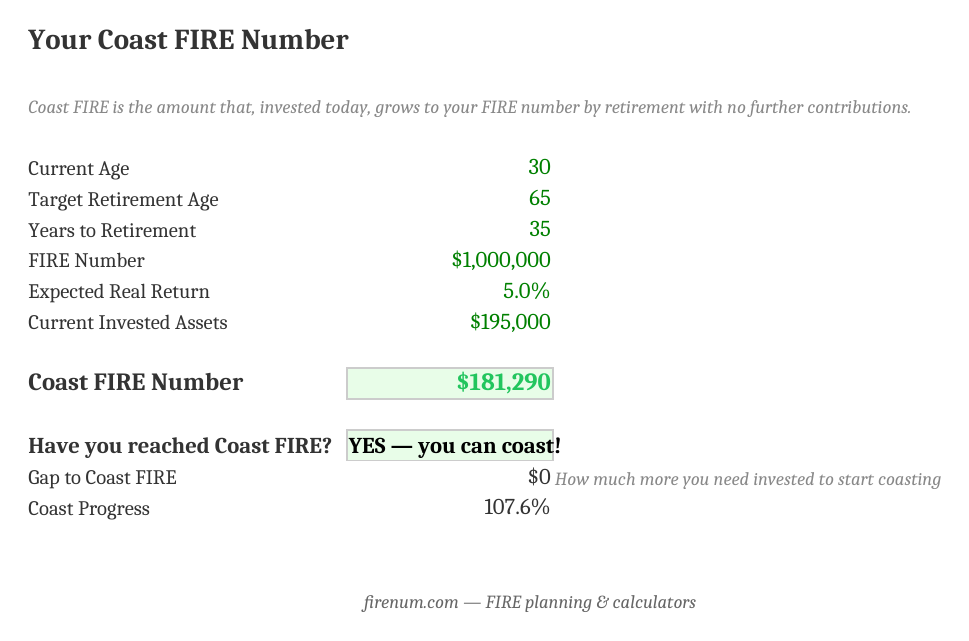
The Coast Number tab tells you the amount you'd need invested today to stop saving and still hit your FIRE number, whether you're already there, and how big the gap is.
3. Explore the Coast Matrix
The matrix shows coast numbers across current ages and retirement ages. It's the quickest way to see how much earlier saving (or a later retirement) lowers the bar.
4. Check the glide path and scenarios
The Glide Path chart shows your coast balance rising to meet your FIRE number at retirement. The Return Scenarios tab shows how the number shifts if markets return less than you hope.
No Macros, Pure Formulas
Standard spreadsheet formulas only. No macros, no VBA. Full transparency, works identically in Excel, Google Sheets, and LibreOffice, and no security prompts.
Frequently Asked Questions
Your Coast FIRE number is the amount that, if invested today and left untouched, grows to your full FIRE number by retirement with no further contributions. The spreadsheet computes it as your FIRE number divided by (1 + real return) raised to the years until retirement.
The Coast Matrix is a grid of Coast FIRE numbers by your current age (rows) and target retirement age (columns). It shows at a glance how much you'd need invested today for each combination. Younger ages and later retirement need a smaller number because compounding has more time to work.
Use a real (inflation-adjusted) return because Coast FIRE compares today's dollars to a future target in today's dollars. The US market has returned about 7% real historically; 5-6% is a safer planning number. The Return Scenarios tab shows your Coast number at 4% through 8% so you can see how sensitive it is.
Yes. It uses standard formulas only (no macros), so it imports cleanly into Google Sheets and LibreOffice. Upload the .xlsx to Google Drive and open it, or use File > Import inside Sheets.
The Glide Path tab plots your Coast FIRE balance growing year by year (if you have your coast number today and never contribute again) against your flat FIRE number. The two lines meet at your retirement age, which is the whole point of coasting.
The interactive Coast FIRE calculator gives you an instant answer and a chart in the browser. The spreadsheet is an offline workbook you own and can customize: change the matrix ages, add your own scenarios, or save versions. Use whichever fits how you like to plan.
It carries sequence-of-returns risk: a market crash early in your coasting phase can leave you short. Mitigations include using a conservative 5-6% return, building a 10-20% buffer above your coast number, and keeping some saving capacity. The Return Scenarios tab helps you stress-test the assumption.
Prefer the Interactive Version?
The Coast FIRE calculator gives you the same numbers instantly with a live chart, in 9 currencies. And once you've hit your coast number, the Fire Planner models what comes next: the full drawdown, stress tests, and all.
Try the Coast FIRE Calculator
Instant coast number, interactive growth chart, and scenario comparisons, right in your browser.
Open Coast FIRE Calculator →