A simple, owned record of your FIRE journey. Enter your balances each month and the spreadsheet tracks your net worth, separates your contributions from market growth, and marks each milestone as you cross it.
Works in Excel, Google Sheets, and LibreOffice
What's Included
How to Use the Tracker
Every tab uses the same cell colors: gold cells are inputs you edit, grey cells calculate, and slate values come from other tabs. You only ever type in gold cells.
1. Set your target in the Setup tab
Enter your annual expenses and safe withdrawal rate. The spreadsheet computes your FIRE number (the 25x rule at 4%). Then rename the six account slots to match your own: brokerage, 401(k), Roth, cash, and two spares.
2. Log your balances each month
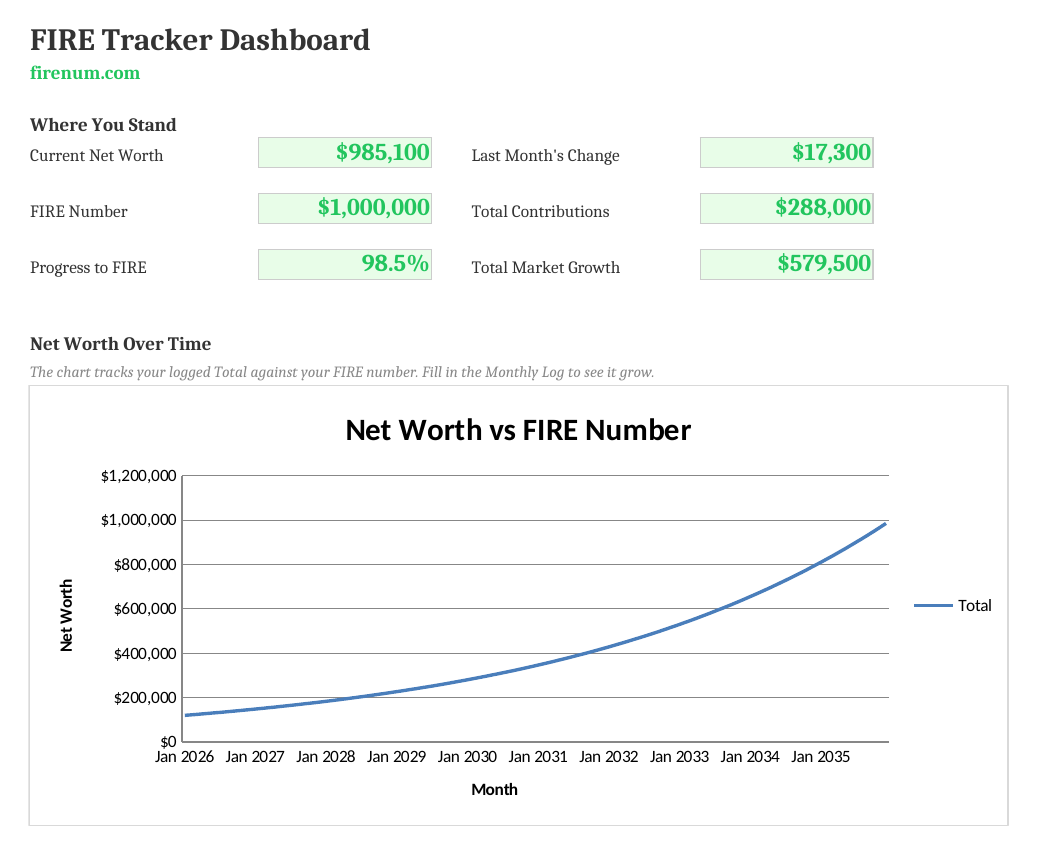
Set your starting month once; the rest fill in automatically. Each month, enter your end-of-month balance for each account and how much you contributed. The Total, month-over-month Change, and market Growth columns calculate themselves.
3. Watch the Dashboard
Your current net worth, progress percentage, and last month's change update from your latest entry. The chart plots your net worth against your FIRE number so you can see the gap close.
4. Track milestones
The Milestones tab flags each threshold from 10% to 100% and records the month you first crossed it, a running history of your journey.
No Macros, Pure Formulas
Standard spreadsheet formulas only. No macros, no VBA. That means:
- Full transparency: every calculation is visible and editable
- Cross-platform: works identically in Excel, Google Sheets, and LibreOffice
- Safe to use: no security warnings, no "enable macros" prompts
Frequently Asked Questions
Set your FIRE number once in the Setup tab, then each month enter your end-of-month balance for each account in the Monthly Log. The Dashboard and Milestones tabs update automatically from your most recent entry: current net worth, progress percentage, last month's change, and which milestones you've crossed.
Yes. Each month you log how much you contributed, and the spreadsheet derives market growth as the change in net worth minus your contributions. Over time you can see how much of your progress is your own saving versus the market's work. It's the same crossover the Fire Planner visualizes.
Yes. It uses standard formulas only (no macros), so it imports cleanly into Google Sheets and LibreOffice. Upload the .xlsx to Google Drive and open it, or use File > Import inside Sheets.
The Monthly Log holds 120 pre-formulated rows, or 10 years of monthly check-ins. The month column fills in automatically once you set your starting month, and the totals, changes, and milestone dates extend across all rows.
Yes. The Setup tab has six account slots (brokerage, 401(k)/IRA, Roth, cash, and two spare). Rename them to match your own accounts and the Monthly Log column headers update automatically.
The spreadsheet is a manual log you own and control offline. The Fire Planner records check-ins automatically, projects your net worth forward month by month, and runs Monte Carlo and historical backtests. Use the spreadsheet for a simple owned record; use the Fire Planner for projections and stress testing.
The Milestones tab marks 10%, 25%, 50%, 75%, 90%, and 100% of your FIRE number. For each one it shows the target amount, whether you've reached it, and the first month in your log where your net worth crossed that line.
Want Automatic Tracking?
The spreadsheet is great if you want an owned, offline record. If you'd rather have check-ins recorded for you (with projections, milestone ticks on your progress bar that name the next one up, and charts that update as you go), the Fire Planner does it in your browser, with your data saved locally. For the method behind it, see how to track FIRE progress.
Try the Interactive Version
The Fire Planner tracks your progress automatically, projects your retirement date, and stress-tests your plan. No spreadsheet maintenance required.
Open Fire Planner →